Amount Field in Opportunity Created from Store Transaction

Hi,
We just started using a Store to sell some merchandise, and have it set so that an Opportunity is created for each transaction. However the amount field on the opportunity is just the item total, and does not include shipping cost (when it is applicable). Is there a way to have the amount be “total charged”?
Let me know if you need more information or account access.
Thanks!
Meredith
-
Official comment

Good day Mgallogly
Thank you for your question.
Currently, the shipping amount is not combined with the item total in the Opportunity Amount field. By design, the Opportunity reflects only the item total, as shipping is treated as a separate line item in the transaction. This separation allows for more accurate reporting and accounting, especially when analyzing merchandise sales versus fulfillment costs.
However, if you'd like to track shipping amounts as Opportunities as well, you can enable the option to create a separate Opportunity for shipping.
To enable this:- Navigate to Click & Pay Suite > Opportunity > Opportunity / Product
- Click on New
- For the "Based On" option, select Miscellaneous
- Then choose Shipping from the available options
Please refer to the image below for guidance:
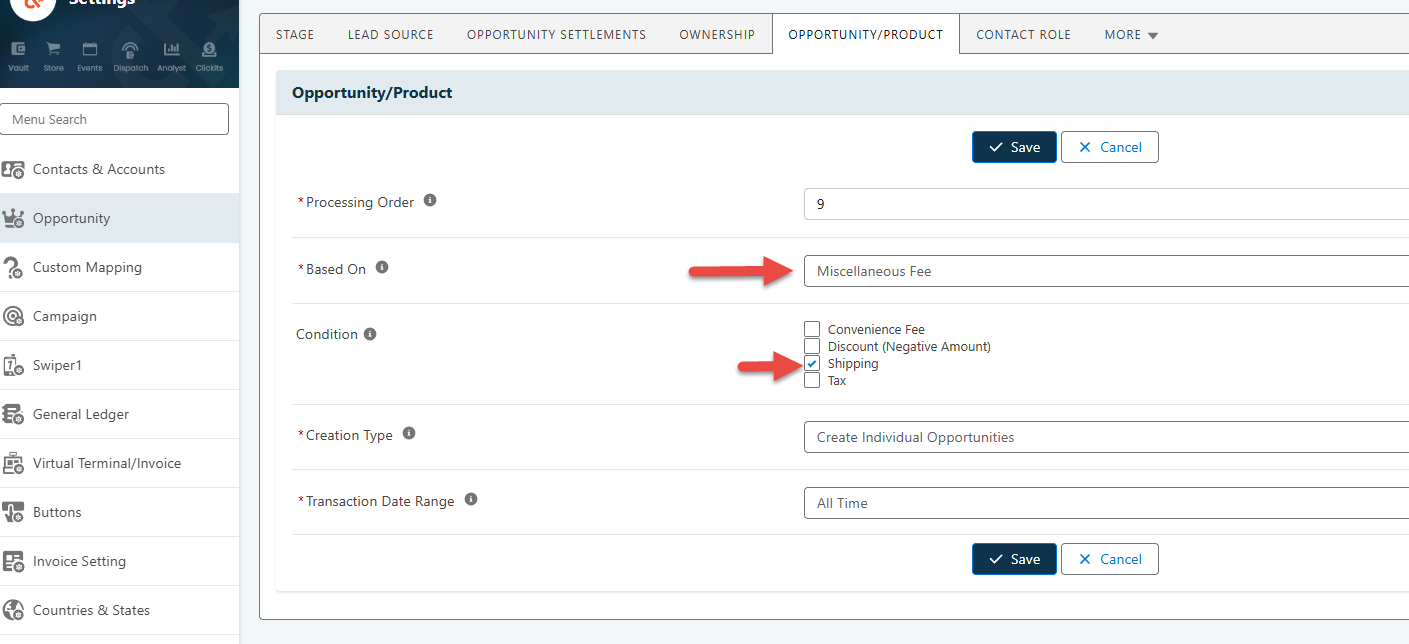
This will generate a second Opportunity for the shipping amount, allowing you to track both item totals and shipping charges within Salesforce.
Hope that answers your question. Please let us know if we can be of any further assistance.
-
Thank you!
I just set this up and reposted the transaction, and it worked!
Follow up question: does the shipping amount have its own item SKU? Or should I use something like Connect Campaign to set the record type and campaign source?
0 -
We don't have SKUs for Shipping. However, you can map the Record Type and Primary Campaign Source to the Opportunity under:
- Click & Pay Suite > Opportunity > Record Type
- Click & Pay Suite > Campaign > Primary
These mappings are condition-based, and you’ll need to review and select the condition(s) that best match your specific use case.
0 -

Hello, had this question before, thank you for asking it
0
Please sign in to leave a comment.
Comments
4 comments